
Deletion in AEP
16 Aug 2026 » Platform
This is the first post of a series where I will tackle one of the most controversial features in the Adobe Experience Platform (AEP): deletion of data in AEP. I will explain the background and the different options that you have to remove data from AEP.
Initially, one may think that issuing a DELETE SQL command is standard and should be easy to implement in AEP. However, as I have mentioned multiple times, AEP is not based on a Relational Database Management System (RDBMS). I will not get into the details, but this is something that differentiates AEP from other Customer Data Platforms, and why I believe AEP is superior. The downside is that deleting data becomes more complex.
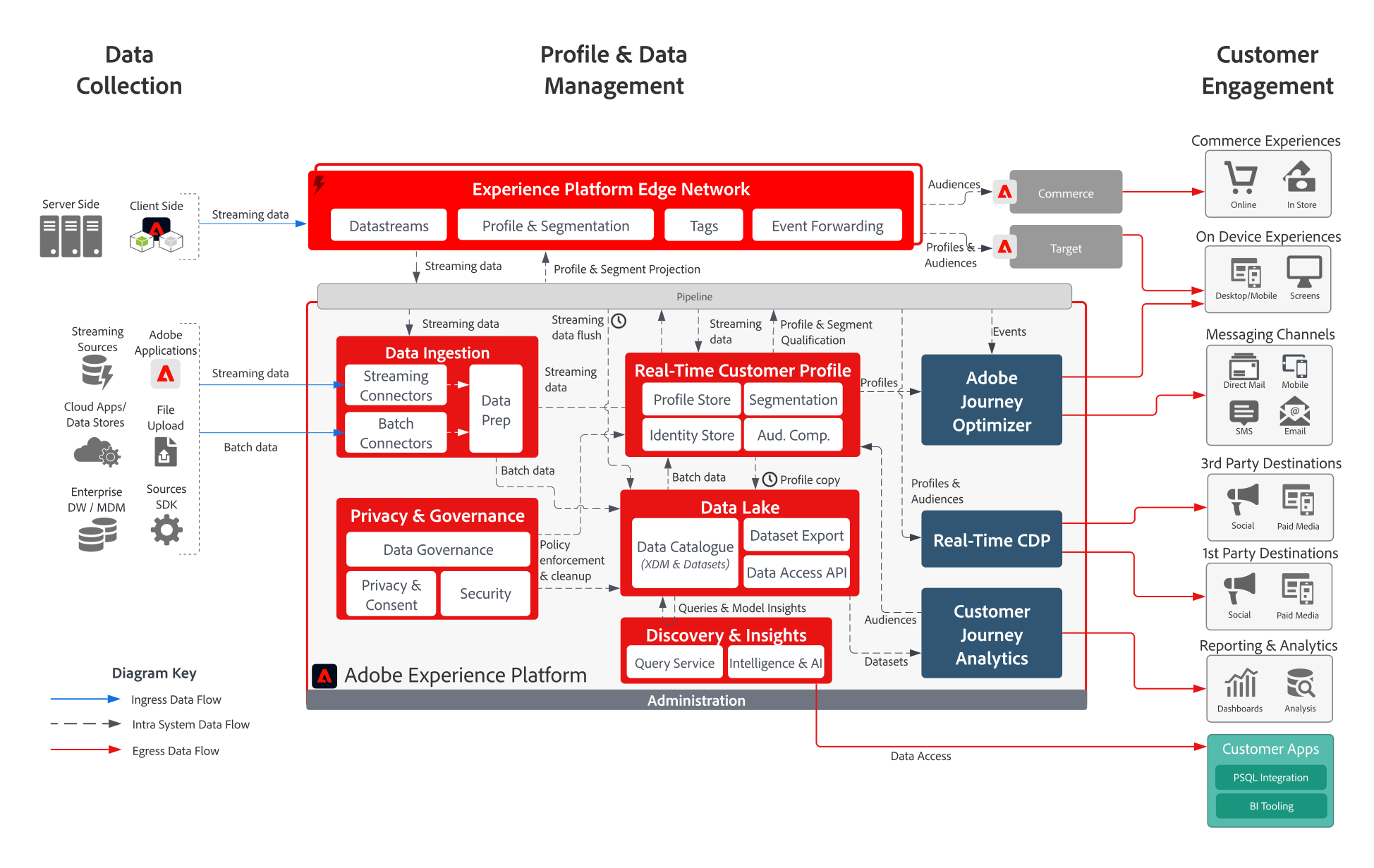
Let me bring once more AEP’s reference architecture, as it will be useful in this post:
Finding the Profile
In my post on profile projection, I explained in great detail that there is no such thing as a “profile”. In fact, for a given identity, you may get different profile projections depending on the merge policy you choose. Here you can see the key of the difficulties in deleting profiles: you have to start by defining what profile you want to delete.
The first thing to consider is the identity. The Unified Identity Service links identities in a graph. Are you interested in deleting all fragments associated with all identities in an identity graph, or only fragments associated with a single identity? Even more, do you want to delete the graph too?
The second step is to evaluate, once you have decided on identities, what fragments in the Unified Profile Service compose the profile you want to delete and whether they are attributes or events. Each type of fragment behaves differently and has different options to delete them.
Finally, profile data lives in two places: the Real-Time Customer Profile and the Data Lake. Given that these AEP building blocks are so different, deleting the data from them will require diverse methods. Do you want to delete the data from both locations or only one?
Deletion Options
I hope it is now clear that the very concept of “deletion” is not as clear as one would initially think and, consequently, AEP does not have one universal “delete profile” operation. The correct method depends on:
- What must be removed: Unified Profile Store data, Data Lake records, Unified Identity Service linkages, or all three.
- The deletion scope: one profile, a set of identities, a dataset, or anonymous profiles based on retention.
- The reason: legal privacy request, data correction, data minimization, retention management, or removal of an incorrectly loaded dataset.
In the coming posts I will explain the different methods to delete data, based on the answers to the previous questions:
| Method | Requirement | Main scope |
|---|---|---|
| Privacy Service | GDPR, CCPA, or other data-subject erasure | Unified Identity Service, Unified Profile Service, and optionally Data Lake |
| Data Lifecycle record deletion | Remove known customer IDs for cleansing or minimization | Records from selected datasets, impacting Unified Profile Service and Unified Identity Service |
| Profile system jobs API | Correct Profile Store data without deleting the source data | Unified Profile Service only |
| Dataset deletion or scheduled dataset expiration | Remove an entire bad, test, or retired source | Data Lake, Unified Profile Service, and Unified Identity Service |
| Pseudonymous Profile expiration | Automatically remove old anonymous profiles | Eligible anonymous profiles and related events |
| Experience Event expiration | Automatically remove old behavioral events | Experience Events; not necessarily profile attributes |
| Batch deletion | Remove only a processed ingestion batch | Data Lake only; insufficient for Unified Profile Service deletion |